GCP Data Access
This page explains how to configure a GCP service account for Aurora that cannot access personally identifiable information. The service account uses the Service Account Key authentication method.
Service account roles
Every Aurora GCP service account receives the following infrastructure roles. These provide full investigation capability (pod status, metrics, deployments, events, resource inventory) without exposing logs, database contents, traces, or any other data that may contain PII.
export PROJECT_ID="your-project-id"

gcloud iam service-accounts create aurora-connector \
  --project=$PROJECT_ID \
  --display-name="Aurora Connector"

SA=aurora-connector@$PROJECT_ID.iam.gserviceaccount.com

gcloud projects add-iam-policy-binding $PROJECT_ID \
  --member="serviceAccount:$SA" --role="roles/container.viewer"

gcloud projects add-iam-policy-binding $PROJECT_ID \
  --member="serviceAccount:$SA" --role="roles/monitoring.viewer"

gcloud projects add-iam-policy-binding $PROJECT_ID \
  --member="serviceAccount:$SA" --role="roles/compute.viewer"

gcloud projects add-iam-policy-binding $PROJECT_ID \
  --member="serviceAccount:$SA" --role="roles/cloudasset.viewer"

gcloud projects add-iam-policy-binding $PROJECT_ID \
  --member="serviceAccount:$SA" --role="roles/cloudsql.viewer"
| Role | What it provides |
|---|---|
container.viewer | GKE cluster config, pod status, deployments, events, services (no pod logs) |
monitoring.viewer | Metrics, alerts, dashboards, uptime checks |
compute.viewer | VM names, zones, machine types, status, IPs |
cloudasset.viewer | Full resource inventory and dependency mapping |
cloudsql.viewer | Database instance metadata, versions, connectivity config (no data access) |
| Blocked by design | Why |
|---|---|
Pod logs (kubectl logs) | container.pods.getLogs not in container.viewer |
| Cloud Logging entries | No logging.* permissions |
| Database connections | No cloudsql.client — metadata only |
| Traces, error reports | No cloudtrace.* or errorreporting.* permissions |
| Cloud Storage | No storage.* permissions |
This baseline configuration is sufficient if your primary logging is in an external observability platform (Datadog, Splunk, New Relic, Elastic) that handles PII filtering natively. Aurora connects to that platform separately for log-based investigation.
If you also want Aurora to read GCP logs with PII automatically stripped, continue with the redaction pipeline below.
Optional: GCP log access with PII redaction
A Dataflow pipeline deployed within your project routes logs through Google's Sensitive Data Protection (DLP) API, which strips PII before writing the results to a separate log bucket. Aurora is granted read access only to that redacted bucket.
Architecture
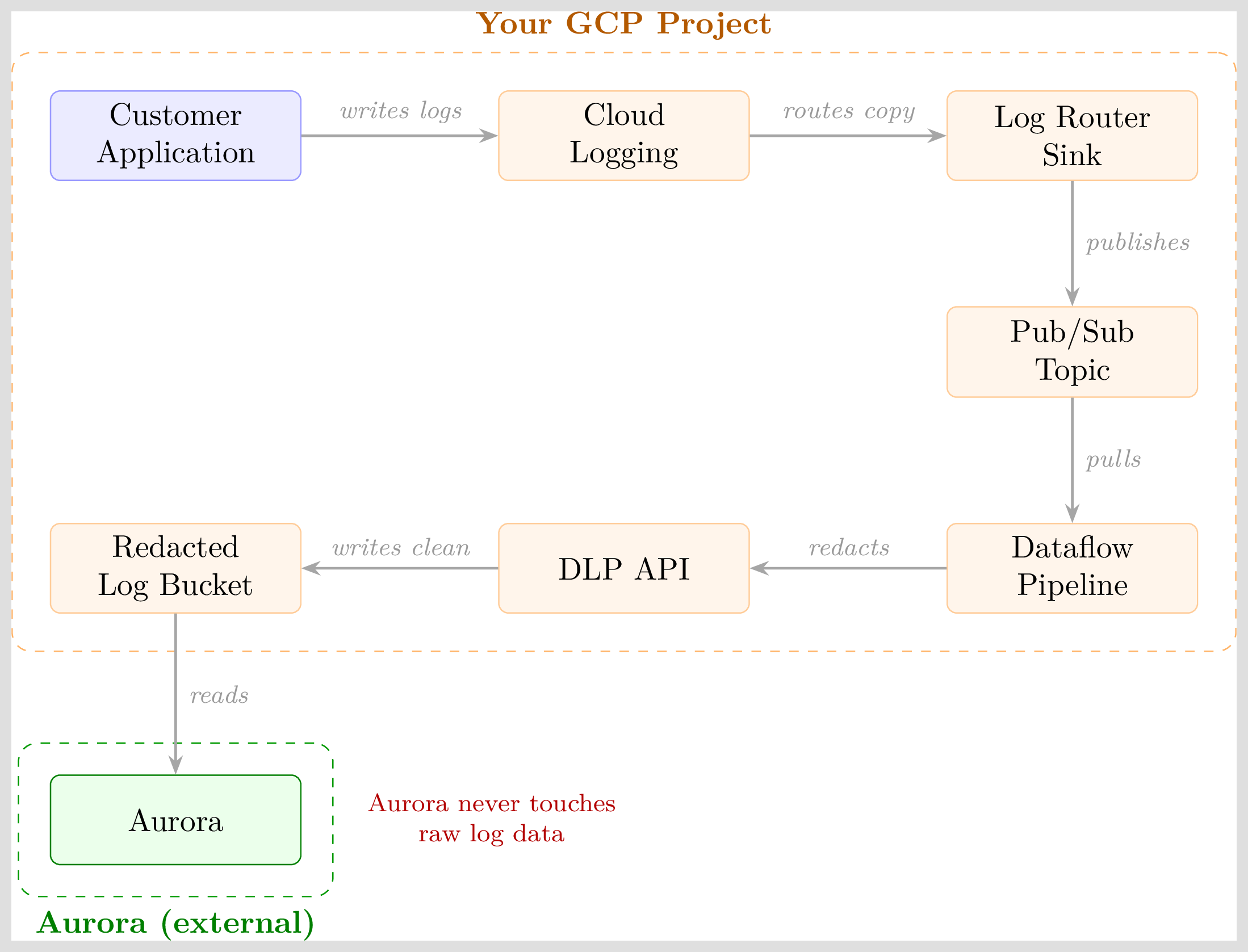
Every component runs inside your GCP project. The DLP API identifies and removes PII before the redacted entries are written to the destination bucket. Aurora has read access exclusively to that destination. There is no path by which Aurora receives unredacted data.
The DLP API uses machine learning classifiers to detect PII. With default settings (ALL_BASIC mode), it automatically identifies 50+ sensitive data types including email addresses, phone numbers, social security numbers, credit card numbers, IP addresses, physical addresses, dates of birth, person names, and driver's license numbers.
Pipeline setup
1. Enable APIs
gcloud services enable dlp.googleapis.com --project=$PROJECT_ID
gcloud services enable pubsub.googleapis.com --project=$PROJECT_ID
gcloud services enable dataflow.googleapis.com --project=$PROJECT_ID
2. Create Pub/Sub topic and subscription
gcloud pubsub topics create aurora-log-redaction \
  --project=$PROJECT_ID

gcloud pubsub subscriptions create aurora-log-redaction-sub \
  --topic=aurora-log-redaction \
  --project=$PROJECT_ID \
  --ack-deadline=60
3. Create the Log Router Sink
gcloud logging sinks create aurora-redaction-sink \
  pubsub.googleapis.com/projects/$PROJECT_ID/topics/aurora-log-redaction \
  --project=$PROJECT_ID \
  --log-filter='resource.type="gce_instance" OR resource.type="k8s_container"'
Adjust --log-filter to match the log sources you want to redact. Omitting the filter routes all logs (higher volume, higher cost).
The command outputs a service account ID. Grant it publish access:
gcloud pubsub topics add-iam-policy-binding aurora-log-redaction \
  --project=$PROJECT_ID \
  --member="serviceAccount:<SERVICE_ACCOUNT_FROM_OUTPUT>" \
  --role="roles/pubsub.publisher"
4. Create destination for redacted logs
gcloud logging buckets create aurora-redacted \
  --location=global \
  --project=$PROJECT_ID \
  --retention-days=30
5. Create service account for Dataflow
This is a separate service account used by the pipeline itself (not the one Aurora connects with).
gcloud iam service-accounts create aurora-dataflow-redaction \
  --project=$PROJECT_ID \
  --display-name="Aurora DLP Redaction Pipeline"

PIPELINE_SA=aurora-dataflow-redaction@$PROJECT_ID.iam.gserviceaccount.com

gcloud projects add-iam-policy-binding $PROJECT_ID \
  --member="serviceAccount:$PIPELINE_SA" --role="roles/dataflow.worker"

gcloud projects add-iam-policy-binding $PROJECT_ID \
  --member="serviceAccount:$PIPELINE_SA" --role="roles/pubsub.subscriber"

gcloud projects add-iam-policy-binding $PROJECT_ID \
  --member="serviceAccount:$PIPELINE_SA" --role="roles/dlp.user"

gcloud projects add-iam-policy-binding $PROJECT_ID \
  --member="serviceAccount:$PIPELINE_SA" --role="roles/logging.logWriter"

gcloud projects add-iam-policy-binding $PROJECT_ID \
  --member="serviceAccount:$PIPELINE_SA" --role="roles/storage.objectAdmin"
6. Create temp storage bucket for Dataflow
gsutil mb -p $PROJECT_ID -l us-central1 \
  gs://$PROJECT_ID-aurora-dataflow-temp
7. Deploy the redaction pipeline
This pipeline is adapted from Google's open source reference implementation (source, Apache 2.0 license) with the inspection config set to detect all PII types.
Install dependencies:
pip install 'apache-beam[gcp]' google-cloud-dlp google-cloud-logging
Save as log_redaction_pipeline.py:
from __future__ import annotations
import argparse, json, logging

from apache_beam import (
    CombineFn, CombineGlobally, DoFn, io, ParDo, Pipeline, WindowInto,
)
from apache_beam.error import PipelineError
from apache_beam.options.pipeline_options import (
    GoogleCloudOptions, PipelineOptions,
)
from apache_beam.transforms.window import FixedWindows
from google.cloud import dlp_v2, logging_v2

INSPECT_CFG = {"min_likelihood": "POSSIBLE"}

REDACTION_CFG = {
    "info_type_transformations": {
        "transformations": [{
            "primitive_transformation": {
                "replace_with_info_type_config": {}
            }
        }]
    }
}


class PayloadAsJson(DoFn):
    def process(self, element):
        yield json.loads(element.decode("utf-8"))


class BatchPayloads(CombineFn):
    def create_accumulator(self):
        return []

    def add_input(self, accumulator, input):
        accumulator.append(input)
        return accumulator

    def merge_accumulators(self, accumulators):
        return [i for a in accumulators for i in a]

    def extract_output(self, accumulator):
        return accumulator


class LogRedaction(DoFn):
    def __init__(self, region, project_id):
        self.project_id = project_id
        self.region = region
        self.dlp_client = None

    def _log_to_row(self, entry):
        payload = entry.get("textPayload", "")
        return {"values": [{"string_value": payload}]}

    def setup(self):
        if self.dlp_client:
            return
        self.dlp_client = dlp_v2.DlpServiceClient()
        if not self.dlp_client:
            raise PipelineError("Cannot create DLP client")

    def process(self, logs):
        if not logs:
            return
        table = {
            "table": {
                "headers": [{"name": "textPayload"}],
                "rows": list(map(self._log_to_row, logs)),
            }
        }
        response = self.dlp_client.deidentify_content(
            request={
                "parent": f"projects/{self.project_id}/locations/{self.region}",
                "inspect_config": INSPECT_CFG,
                "deidentify_config": REDACTION_CFG,
                "item": table,
            }
        )
        for idx, log in enumerate(logs):
            log["textPayload"] = (
                response.item.table.rows[idx].values[0].string_value
            )
        yield logs


class IngestLogs(DoFn):
    def __init__(self, destination_log_name):
        self.destination_log_name = destination_log_name
        self.logger = None

    def _replace_log_name(self, entry):
        entry["logName"] = self.logger.name
        return entry

    def setup(self):
        if self.logger:
            return
        client = logging_v2.Client()
        if not client:
            raise PipelineError("Cannot create Logging client")
        self.logger = client.logger(self.destination_log_name)

    def process(self, element):
        if self.logger:
            logs = list(map(self._replace_log_name, element))
            self.logger.client.logging_api.write_entries(logs)
            yield logs


def run(pubsub_subscription, destination_log_name,
        window_size, pipeline_args=None):
    pipeline_options = PipelineOptions(
        pipeline_args, streaming=True, save_main_session=True
    )
    region = "us-central1"
    try:
        region = pipeline_options.view_as(GoogleCloudOptions).region
    except AttributeError:
        pass

    pipeline = Pipeline(options=pipeline_options)
    _ = (
        pipeline
        | "Read from Pub/Sub"
        >> io.ReadFromPubSub(subscription=pubsub_subscription)
        | "Parse JSON"
        >> ParDo(PayloadAsJson())
        | "Window"
        >> WindowInto(FixedWindows(window_size))
        | "Batch"
        >> CombineGlobally(BatchPayloads()).without_defaults()
        | "Redact PII"
        >> ParDo(
            LogRedaction(region, destination_log_name.split("/")[1])
        )
        | "Write redacted logs"
        >> ParDo(IngestLogs(destination_log_name))
    )
    pipeline.run()


if __name__ == "__main__":
    logging.getLogger().setLevel(logging.INFO)
    parser = argparse.ArgumentParser()
    parser.add_argument("--pubsub_subscription")
    parser.add_argument("--destination_log_name")
    parser.add_argument("--window_size", type=float, default=60.0)
    known_args, pipeline_args = parser.parse_known_args()
    run(
        known_args.pubsub_subscription,
        known_args.destination_log_name,
        known_args.window_size,
        pipeline_args,
    )
Deploy to Dataflow:
PIPELINE_SA=aurora-dataflow-redaction@$PROJECT_ID.iam.gserviceaccount.com
SUB=projects/$PROJECT_ID/subscriptions/aurora-log-redaction-sub
DEST=projects/$PROJECT_ID/logs/aurora-redacted

python log_redaction_pipeline.py \
  --pubsub_subscription=$SUB \
  --destination_log_name=$DEST \
  --window_size=60 \
  --runner=DataflowRunner \
  --project=$PROJECT_ID \
  --region=us-central1 \
  --temp_location=gs://$PROJECT_ID-aurora-dataflow-temp/tmp \
  --service_account_email=$PIPELINE_SA \
  --num_workers=1 \
  --max_num_workers=3
Once deployed, the job appears in the GCP console under Dataflow > Jobs as a streaming pipeline. It runs continuously until manually stopped.
Verification
Write a test log entry containing known PII:
gcloud logging write test-log \
  "ERROR: User john@example.com from IP 10.0.0.1, SSN 123-45-6789" \
  --project=$PROJECT_ID --severity=ERROR
After 10-15 seconds, the redacted output appears in the aurora-redacted bucket:
ERROR: User [EMAIL_ADDRESS] from IP [IP_ADDRESS], SSN [US_SOCIAL_SECURITY_NUMBER]
8. Grant Aurora's connector SA read access to redacted logs
Add logging.viewAccessor to the Aurora connector SA, restricted to the redacted bucket's view:
SA=aurora-connector@$PROJECT_ID.iam.gserviceaccount.com

gcloud projects add-iam-policy-binding $PROJECT_ID \
  --member="serviceAccount:$SA" \
  --role="roles/logging.viewAccessor" \
  --condition='expression=resource.name.endsWith("aurora-redacted/views/_AllLogs"),
    title=redacted-logs-only'
Aurora reads logs from the redacted bucket with:
gcloud logging read "<filter>" \
  --bucket=aurora-redacted \
  --location=global \
  --view=_AllLogs \
  --project=$PROJECT_ID
The SA cannot read from _Default or any other bucket.
9. Add to Aurora knowledge base
Aurora's agent needs to know the bucket name to query logs. Add a knowledge entry so the agent discovers it during investigation:
- In Aurora, navigate to Knowledge Base
- Add an entry with content similar to:
GCP logs for this project are in a redacted bucket. To read logs, use:
gcloud logging read "<filter>" --bucket=aurora-redacted --location=global --view=_AllLogs --project=<project-id>Do not attempt to read from the default bucket.
Without this, the agent will receive a permission denied error on standard log reads and will not be able to discover the bucket name on its own.
Scope
The sink can be created at project, folder, or organization level. An org-level aggregated sink captures logs from all projects in one pass:
gcloud logging sinks create aurora-redaction-sink \
  pubsub.googleapis.com/projects/$PROJECT_ID/topics/aurora-log-redaction \
  --organization=$ORG_ID
This requires roles/logging.configWriter at the organization level.
Connect to Aurora
Once the service account is configured, download its key and connect via the Aurora UI:
gcloud iam service-accounts keys create aurora-connector-key.json \
  --iam-account=aurora-connector@$PROJECT_ID.iam.gserviceaccount.com
Then follow the Service Account Key connector setup to upload the key in Aurora.